Canceled Subscription Still Charging You? 2026 Fix
Canceled a subscription but still being charged? The 9 reasons it happens, the Visa dispute rule that changed on April 18, 2026, and the exact steps to stop it.
Canceled a subscription but still being charged? It is one of the most common money complaints there is, and it almost never has one cause. Sometimes you canceled on the wrong account. Sometimes the merchant kept your card on file and your bank quietly handed it your new card number. Sometimes the company simply ignored you — which, under federal law and the card networks' own rulebooks, it is not allowed to do. This guide walks through the nine reasons a canceled subscription keeps billing, the proof you need to collect, and the exact dispute rights on a credit card, a debit card and PayPal — including a Visa rule that changed on April 18, 2026 and now punishes anyone who cancels after the renewal instead of before it.
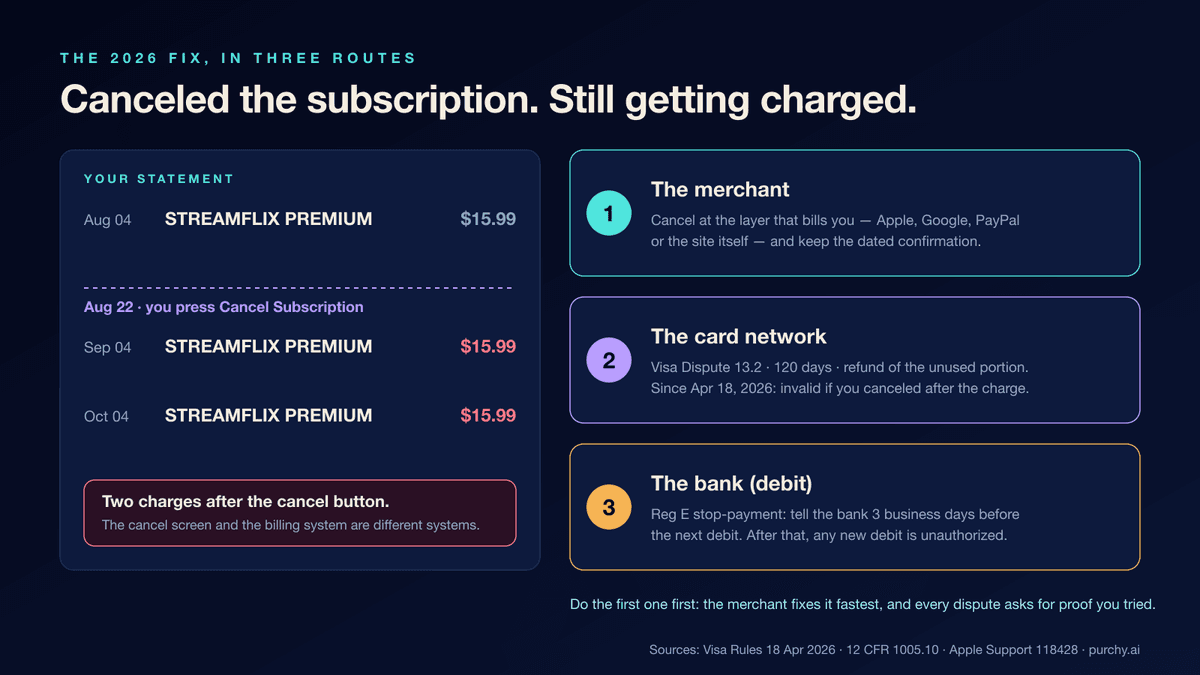
The 30-second version
- Cancellation and billing are two different systems. A "Cancel" button tells the merchant to stop; your bank only stops when you tell the bank. Do both.
- Most repeat charges are a wrong-layer problem. Subscriptions billed through Apple, Google Play, PayPal or a phone carrier can only be canceled there. Apple's own support page says so in plain words: if you can't find a receipt from Apple, "you might've bought the subscription from another company … contact the company that bills you."
- A new card number does not stop a subscription. Visa requires U.S. issuers to enroll their consumer cards in Visa Account Updater and submit reissued numbers to it, where merchants that store your card can retrieve them (Visa Rule 8.6.1.1). You can ask your bank to opt out, but by default the merchant gets your new card.
- On a credit card, the tool is a "cancelled recurring" dispute. Visa Dispute Condition 13.2 gives your bank 120 calendar days from the transaction processing date, limits the refund to the unused portion of the service, and — since April 18, 2026 — treats the dispute as invalid if your cancellation came after the date of the charge. Cancel before the renewal, not after.
- On a debit card, the tool is a Regulation E stop-payment. Notify your bank orally or in writing at least three business days before the next scheduled debit (12 CFR 1005.10(c)). Once you have told the bank the merchant is no longer authorized, any further debit is an "unauthorized electronic fund transfer" you can report as an error, with a 10-business-day investigation clock (and provisional credit if the bank needs longer).
- The merchant is not allowed to make this hard. ROSCA (15 U.S.C. § 8403) requires "simple mechanisms" to stop recurring charges, and Visa's merchant rules require "a simple cancellation procedure, and, if the Cardholder's order was initially accepted online, at least an online cancellation procedure."
First, confirm it is really the same subscription
Before you dispute anything, spend five minutes making sure the charge is what you think it is. A surprising share of "still being charged" complaints are a different product, a different account, or a different kind of transaction entirely.
Read the statement line, not the app. Bank and card apps often show a cleaned-up merchant name. Open the full transaction detail and look at three things:
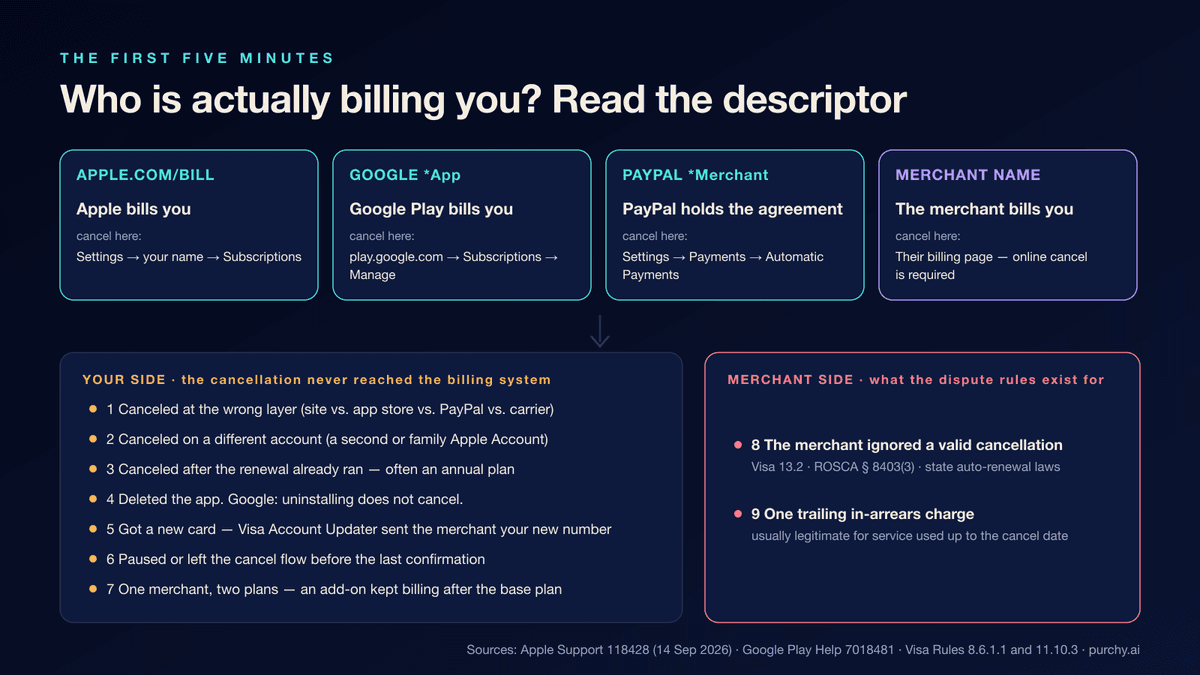
- The descriptor. A line that reads "APPLE.COM/BILL" means Apple is the merchant of record, not the app you subscribed to. "GOOGLE *YouTube" means Google Play. "PAYPAL *SPOTIFY" means PayPal is the layer that holds the billing agreement. A charge that reads "SPOTIFY USA" was billed by Spotify directly. Each of these is canceled in a different place — see the platforms section.
- The amount and cadence. A $15.99 charge on the 4th of every month is a subscription. A $9.99 charge and a $4.99 charge from the same merchant on different days may be two plans (a base plan plus an add-on), and you may have canceled only one.
- Pending or posted? If the charge is still pending a day or two after you canceled, it may be an authorization that will drop off rather than a completed charge. Wait for it to post before you dispute it; issuers generally will not open a dispute on a pending item.
Then find the receipt. Apple's guidance, verbatim from its "Cancel a subscription from Apple" page (published September 14, 2026): "Search your email for the words 'receipt from Apple' or 'invoice from Apple'. On the receipt for the subscription, check which Apple Account was used." If a family member's Apple Account appears on the receipt, Apple is blunt: "You can't cancel a family member's subscription." They have to do it.
Only once you know who is billing you and which account it is tied to does the rest of this guide apply.
The nine reasons a canceled subscription keeps charging
These are ordered roughly from most to least common. The first seven are on your side of the fence — the cancellation never reached the billing system, or didn't cover everything. The last two are on the merchant's side: one is the violation the dispute rules exist for, and one is usually legitimate.
1. You canceled at the wrong layer
This is the big one. When you subscribe inside an iPhone app, Apple bills you; the app's own website cannot cancel an Apple-billed subscription and Apple cannot cancel one billed by the app's website. The same split exists for Google Play, PayPal billing agreements, Amazon, and subscriptions bundled by a wireless carrier. Apple's page gives exactly this instruction for the last case: "Cancel a subscription you received through your wireless carrier or other provider: Contact your wireless carrier or other provider for support."
The tell: the merchant's account page says "no active subscription" while your card keeps getting charged. The subscription is alive in a system that page can't see.
2. You canceled on a different account
Two email addresses, a shared family plan, an old Apple Account you forgot existed. Google Play and Apple both scope subscriptions to the signed-in account, so a cancellation on one account does nothing to a subscription on another. Apple's page covers it directly: "If another Apple Account that you use appears on the receipt: sign in to the Apple Account that appears on the receipt to cancel the subscription."
3. You canceled after the renewal had already run — often an annual one
Most subscriptions cancel at the end of the paid period, not immediately. Google Play's worked example: buy a one-year subscription on January 1, cancel on July 1, and "you'll have access to the subscription until December 31. You won't be charged another yearly subscription … the following January 1." That is fine when you know it. It hurts when a $120 annual plan renews on the 3rd and you cancel on the 5th — the charge you are looking at is the one you were a little too late to prevent, and the merchant will say the next year is already paid for.
Not every annual plan works that way, and it is worth checking before you accept the loss. Service contracts in particular often pay back the unused portion if you cancel outright rather than simply stopping the renewal — Apple's AppleCare+ terms draw exactly that line, and our guide to which AppleCare+ exit pays most walks through the clause that pays a pro-rata refund when you cancel outright instead of letting the plan lapse.
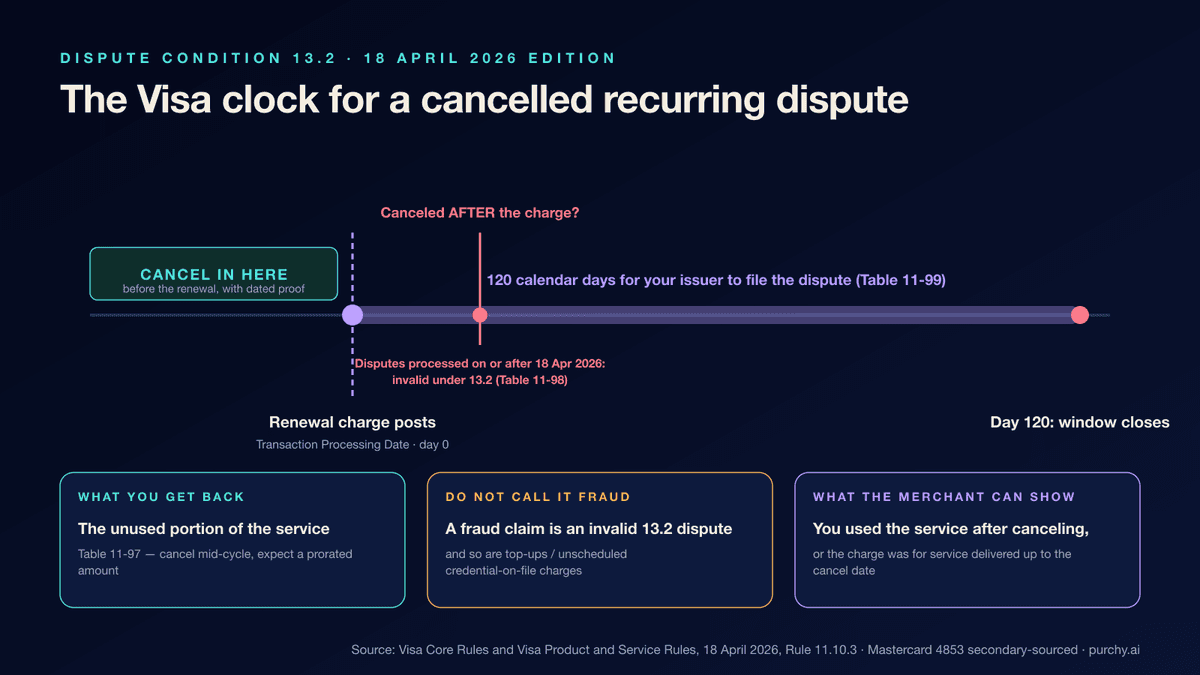
This is also where the April 18, 2026 Visa change bites. Under the current edition of the Visa rules, a "cancelled recurring" dispute is invalid for "a Transaction in which the Cardholder's cancellation was after the date of the Transaction" (Table 11-98, effective for disputes processed on or after 18 April 2026). If you canceled two days after the renewal, the chargeback route for that specific charge is closed; what remains is the merchant's own refund policy and, in some states, an auto-renewal law. Cancel in time and the dispute is available — capped at "the unused portion of the service" (Table 11-97).
4. You deleted the app and assumed that was a cancellation
It is not, on either platform. Google Play states it plainly, under an "Important" callout on its cancellation page: "When you uninstall an app, your subscription won't cancel." Apple's flow is the Settings → your name → Subscriptions screen, which is unaffected by whether the app is installed.
5. You got a new card number — and your bank forwarded it to the merchant
Many people replace a card specifically to kill a subscription. On Visa cards this usually fails by design. Visa Rule 8.6.1.1 requires an issuer in the U.S. Region to enroll "all BINs" in Visa Account Updater, with a short list of exclusions (commercial cards, prepaid cards, ATM-only, single-use virtual accounts and U.S.-territory BINs), and to "submit updates for Cards under its enrolled BINs whenever reissuance or a change in account status occurs." A merchant that keeps a card on file can, through its acquirer, query the service and receive your new number and expiration date. The rule does allow an "Opt-Out" advice, "permitted only if the Cardholder requests that specific new information not be provided" — so you can ask your bank not to share the new number, but you have to ask. Mastercard operates an equivalent service (Automatic Billing Updater); its rules are not published in a public document we could read, so treat the mechanics as the same in practice but unverified in the text.
The practical consequence: a new card is not a cancellation, and a closed account is not a cancellation either until the merchant is told. Cancel with the merchant first.
6. You paused, downgraded, or left the flow one tap early
Cancel flows are often several screens long, with a "Keep my benefits" offer in the middle. If you backed out before the final confirmation, nothing changed. Apple gives a simple test for its own subscriptions: "If there is no Cancel button or you see an expiration message in red text, the subscription is already canceled." The inverse is the diagnosis — if the Cancel button is still there, it wasn't.
7. One merchant, two plans
A cloud-storage plan and a music plan under the same account; a base subscription plus a "premium support" add-on; a course platform with a separate community fee. Canceling one line does not cancel the other. Go back to the merchant's billing page and look for anything else with a renewal date.
8. The merchant ignored the cancellation
Now we are on the merchant's side of the fence. A cancel request that was confirmed on screen or by email, followed by another charge, is exactly the scenario Visa Dispute Condition 13.2 exists for: "The Cardholder withdrew permission to charge the Payment Credential for a Recurring Transaction." It is also, for an online subscription, a violation of ROSCA's requirement that the seller provide "simple mechanisms for a consumer to stop recurring charges." This is the case you win — provided you have the proof described in Step 1.
9. A trailing charge for service you used before the cancellation date
Some merchants bill in arrears — the charge on the 1st is for the previous month. Visa explicitly protects that: an acquirer can defeat a cancelled-recurring dispute by showing "the Merchant posts charges to Cardholders after services have been provided and that the Cardholder received services until the cancellation date." Visa even defines the cancellation date as the last day you were allowed to use the service, with an example in the rulebook: a cardholder who "withdrew permission to be billed for their monthly movie subscription on 22 April 2024 and were informed they could use the service until the end of the month" has a cancellation date of April 30, 2024. One final, prorated or in-arrears charge is usually legitimate. A second one is not.
Step 1: Cancel again, at the right layer, and keep the proof
Every dispute route below asks for the same evidence, so collect it now, before you call anyone.
Cancel in the system that actually bills you. Use the descriptor from the confirmation step:
- Billed by Apple → Settings → your name → Subscriptions → the subscription → Cancel Subscription (Apple's steps for iPhone, iPad and Vision Pro are identical; on a Mac it is the App Store → your name → Subscriptions).
- Billed by Google → play.google.com → Subscriptions → Manage → Cancel subscription → pick a reason → Continue.
- Billed through PayPal → Settings → Payments → "Subscriptions and saved businesses" or "Automatic Payments" → the merchant → cancel the automatic payment. The same screen shows the payment method assigned to that merchant and a backup — review both, because canceling the agreement is what stops the payments, not removing a card.
- Billed by the merchant directly → the merchant's own account or billing page. If you signed up online, Visa's merchant rules say there must be an online way to cancel (Rule 5.8.11.1, Table 5-21); if the site forces you to phone or chat, note that, because it is evidence.
Then capture five things. Visa's processing requirements for a 13.2 dispute (Table 11-100) require your issuer to certify, on your word, "the date the Cardholder withdrew permission," "details used to contact the Merchant, such as an email address, telephone number, or physical address," and "details of other form of payment provided to the Merchant (if one was provided)." Cover all of it:
- A screenshot of the confirmation screen with the date visible.
- The confirmation email, if one arrives. If none does within a day, send the merchant a short written cancellation yourself (email or the support form) so you hold a dated copy.
- The date and time you canceled, in your own notes.
- The channel and address you used — the support email, the phone number, the account page URL.
- If you canceled by phone, the agent's name and a case number.
Timing matters more in 2026 than it did last year. Because Visa now treats a cancelled-recurring dispute as invalid when the cancellation came after the charge, the safest practice is to cancel at least a few business days before the renewal date and keep the dated proof. Cancel early, not late.
Step 2: Ask the merchant for the money back (and what Visa requires of them)
Go to the merchant before you go to the bank. It is faster, most companies refund a charge that landed after a documented cancellation without argument, and every dispute rule in the next two sections works better when you can show you tried.
What to put in the request:
- The date you canceled, and how (attach the screenshot or forward the confirmation).
- The date and amount of the charge that came afterward.
- A clear ask: a refund to the original payment method, and written confirmation that the subscription is closed and the card on file is removed.
You can borrow the templates in our guide to getting a refund for a forgotten subscription charge — the structure is the same; only the reason changes from "forgot" to "canceled and charged anyway."
Why merchants usually say yes. Beyond goodwill, the Visa rules a card-accepting merchant signs up to include two obligations that matter here. First, for a Recurring Transaction the merchant must "provide a simple cancellation procedure, and, if the Cardholder's order was initially accepted online, at least an online cancellation procedure." Second, the general rule for stored-credential merchants states: "The Merchant must refund the full amount paid if the Merchant has not adhered to the terms and conditions of the sale or service." A merchant that charged after a valid cancellation has, by definition, not adhered to its own terms. Quoting the rule is not necessary, but knowing it exists tells you the refund is not a favor.
If the answer is no, or silence after a week, move to Step 3 — and do not let the merchant run out your clock. The Visa dispute window is 120 days from the transaction processing date; the Regulation E error window is 60 days from your statement. Both keep ticking while support "looks into it."
Step 3 on a credit card: the "cancelled recurring" chargeback
If you paid with a credit card, your issuer can pull the money back through the card network. On Visa this is Dispute Condition 13.2: Cancelled Recurring Transaction, and the rules for it are public. Here is what they say, read from the 18 April 2026 edition:
When it applies (Table 11-96). Either "the Cardholder withdrew permission to charge the Payment Credential for a Recurring Transaction," or the merchant was told before the transaction that "the Cardholder's account was closed."
How much you can get back (Table 11-97). "The Dispute amount is limited to the unused portion of the service or merchandise." If you canceled on the 20th of a 30-day cycle and were charged for the full month anyway, expect the refund to be prorated, not the full amount.
The deadline (Table 11-99). "120 calendar days from the Transaction Processing Date." That is the bank's deadline for filing; call well before it.
What makes it invalid (Table 11-98). Seven listed conditions, three of which trip up real disputes:
- "A Transaction that the Cardholder states is fraudulent" — do not call a subscription you signed up for "fraud." It is a different dispute condition with different rules, and it can get the whole thing thrown out.
- "An Unscheduled Credential-on-File Transaction" — top-ups and usage-based charges that happen when your balance drops (think a ride-share wallet reload) are not "recurring" in Visa's vocabulary, so 13.2 does not cover them.
- "A Transaction in which the Cardholder's cancellation was after the date of the Transaction" — the new rule, effective for disputes processed on or after 18 April 2026.
What the merchant can come back with (Table 11-101). The acquirer can respond with evidence that "the Cardholder used services after the withdrawal of permission to bill date and prior to the Dispute Processing Date," that "the Cardholder requested cancellation for a different date and services were provided until this date," that a credit was already issued, or that the merchant bills in arrears for services already delivered. Translation: if you kept streaming after you canceled, expect the dispute to lose.
How to file. Call the number on the back of the card or use the issuer's dispute portal, and describe it as a cancelled recurring transaction, not as fraud and not as "I don't recognize this." Give the cancellation date, the channel, and the merchant's response. Your issuer files the dispute; you do not talk to Visa directly. Our credit card dispute guide covers the process end to end, including your separate rights under the Fair Credit Billing Act.
The FCBA backstop. Independently of the network rules, 15 U.S.C. § 1666 obliges a creditor that receives a written billing-error notice "within sixty days after having transmitted to an obligor a statement" to acknowledge and investigate it. A charge for a service you had canceled is a billing error you can assert in writing to the issuer's billing-error address. The 60-day FCBA clock and the 120-day Visa clock are different clocks; the network one is longer, but the statutory one is the one that binds your bank regardless of what the merchant's acquirer argues.
Mastercard. Mastercard's equivalent is message reason code 4853 (Cardholder Dispute) with a "cancelled recurring" sub-reason, and merchant-side guides cite the same 120-day window from the transaction date. Mastercard does not serve its Chargeback Guide from a public URL we could read, so unlike the Visa text above, treat those specifics as secondary-sourced. The evidence you need is the same.
Step 3 on a debit card or bank account: the Regulation E stop-payment
Debit cards and ACH debits are governed by the Electronic Fund Transfer Act and its rule, Regulation E — not by the FCBA. The mechanics are different and in one way better: you can stop the next charge before it happens, not only fight the last one.
Recurring debits are "preauthorized electronic fund transfers." Regulation E defines one as "an electronic fund transfer authorized in advance to recur at substantially regular intervals" (12 CFR 1005.2(k)). A monthly subscription on a debit card fits.
The stop-payment right (12 CFR 1005.10(c)). Verbatim: "A consumer may stop payment of a preauthorized electronic fund transfer from the consumer's account by notifying the financial institution orally or in writing at least three business days before the scheduled date of the transfer." The bank "may require the consumer to give written confirmation of a stop-payment order within 14 days of an oral notification," and if it does, it must tell you so and give you the address when you call. Miss the written confirmation and "an oral stop-payment order ceases to be binding after 14 days." So: call, then put it in writing the same day.
What changes once you have notified the bank. This is the part most guides miss. Regulation E's definition of an unauthorized transfer excludes transfers made "by a person who was furnished the access device to the consumer's account by the consumer, unless the consumer has notified the financial institution that transfers by that person are no longer authorized" (12 CFR 1005.2(m)(1), emphasis added). Until you tell the bank, a merchant you once gave your card to is still "authorized" in the regulation's eyes. After you tell the bank, its next debit is an unauthorized EFT — an "error" under 12 CFR 1005.11(a)(1)(i) — and the error-resolution machinery applies.
The error-resolution clocks (12 CFR 1005.11).
- You must notify the bank "no later than 60 days after the institution sends the periodic statement … on which the alleged error is first reflected."
- The bank "shall investigate promptly and … determine whether an error occurred within 10 business days of receiving a notice of error," and must correct it "within one business day after determining that an error occurred."
- If it needs longer, it "may take up to 45 days" — but only if it "provisionally credits the consumer's account in the amount of the alleged error … within 10 business days of receiving the error notice." That provisional credit is money in your account while the bank investigates.
The fee question. Regulation E gives you the stop-payment right; it does not say the bank must do it for free, and many banks charge a stop-payment fee for ACH stops (fees for debit-card recurring stops vary by bank). Ask before you agree, and if the merchant charge is small, weigh the fee against simply forcing the cancellation through the merchant and the platform. The debit-versus-credit trade-offs are laid out in our debit vs. credit card disputes guide.
Step 3 on PayPal, Apple, Google Play and your phone carrier
When the merchant of record is a platform, the platform is both the place to cancel and the first place to ask for a refund. The underlying card rights still exist behind it, but the platform route is usually faster.
Apple. Cancel in Settings → your name → Subscriptions (or the App Store on a Mac, or account.apple.com from a browser). Apple's page also covers the two hard cases — subscriptions on a family member's or a second Apple Account — and the wireless-carrier bundle case. Refund requests for a charge that came after a cancellation go through Apple's "Report a Problem" flow, not the app developer; the developer cannot refund an Apple-billed charge.
Google Play. Cancel at play.google.com → Subscriptions → Manage → Cancel subscription. Google's page is explicit that access continues "for the time you've already paid," that uninstalling does nothing, and that "your past subscriptions can't be refunded, with some exceptions" spelled out in its refund policy. Prepaid plans "automatically expire" and need no cancellation at all.
PayPal. A PayPal subscription is a billing agreement — PayPal's page calls it "an automatic payment, also known as a subscription, billing agreement, or recurring payment." Cancel it under Settings → Payments → "Subscriptions and saved businesses" or "Automatic Payments," and check the backup funding source on the same screen. Canceling the automatic payment stops PayPal from paying the merchant; it does not close your account with the merchant, so cancel there too.
Wireless carriers and bundles. A streaming service you got "free with your plan" or added to your phone bill is billed by the carrier, and only the carrier can remove it. Apple's instruction for this case is simply "contact your wireless carrier or other provider for support," and the same logic applies to any bundle: cancel with whoever actually bills you.
The law behind all of this: ROSCA, the FTC in 2026, and state auto-renewal laws
You do not need to cite a statute to get a refund. But knowing which rules actually bind the merchant — and which ones are no longer in force — keeps you from making an argument that is wrong.
ROSCA is the federal floor, and it is still in force. The Restore Online Shoppers' Confidence Act, 15 U.S.C. § 8403, makes it "unlawful for any person to charge or attempt to charge any consumer for any goods or services sold in a transaction effected on the Internet through a negative option feature" unless the seller (1) discloses all material terms before taking billing information, (2) obtains "express informed consent before charging the consumer's credit card, debit card, bank account, or other financial account," and (3) "provides simple mechanisms for a consumer to stop recurring charges from being placed on the consumer's credit card, debit card, bank account, or other financial account." A merchant that makes you phone during business hours to cancel a subscription you bought online is exactly what clause (3) is aimed at.
The FTC's "Click-to-Cancel" rule is not in force. The 2024 amendments to the FTC's Negative Option Rule were vacated by the Eighth Circuit on July 8, 2025, before their compliance date. On February 12, 2026 the FTC published a final rule (91 FR 6507) that recodified the Negative Option Rule "as it existed before the effective date of the Commission's 2024 final rule." On March 13, 2026 it opened a fresh rulemaking with an advance notice of proposed rulemaking (91 FR 12318) seeking comment on amendments "to help consumers avoid recurring payments for products and services they did not intend to order and to allow them to cancel such payments without unwarranted obstacles"; comments closed April 13, 2026. As of this writing, no proposed rule has followed. The FTC continues to bring cases under ROSCA and Section 5 of the FTC Act, and the 2024 rule's preamble noted "thousands of consumer complaints each year" about negative-option billing. In short: the Click-to-Cancel headline you may remember is not something you can hold a merchant to today; ROSCA is.
State auto-renewal laws fill the gap. California, Vermont, Oregon, New York, Illinois and others impose their own disclosure, consent and easy-cancellation requirements, and several give a private remedy. Which one protects you depends on where you live; our state auto-renewal laws guide has the state-by-state playbook and a demand-letter template.
Credit vs. debit vs. PayPal: which route, which clock
| You paid with | Your tool | The clock | What you can get | Source |
|---|---|---|---|---|
| Visa credit card | Dispute Condition 13.2, Cancelled Recurring Transaction, filed by your issuer | 120 calendar days from the transaction processing date; invalid if you canceled after the charge (disputes processed on or after Apr 18, 2026) | The unused portion of the service | Visa Rules 11.10.3 (Apr 2026) |
| Mastercard credit card | Reason code 4853, cancelled recurring sub-reason, filed by your issuer | 120 days from the transaction date (secondary-sourced) | The disputed charge, subject to merchant evidence | Merchant-side chargeback guides |
| Any credit card (statute) | Written billing-error notice under the Fair Credit Billing Act | 60 days after the statement showing the charge was sent | Correction of the billing error | 15 U.S.C. § 1666 |
| Debit card or bank account (next charge) | Stop-payment order to your bank | At least 3 business days before the scheduled debit; written confirmation within 14 days if the bank asks | The next debit does not go through | 12 CFR 1005.10(c) |
| Debit card or bank account (a charge that already posted) | Notice of error (unauthorized EFT once the bank has been told the merchant is no longer authorized) | 60 days after the statement; bank decides in 10 business days, or up to 45 days with provisional credit | The erroneous debit, corrected within 1 business day of the finding | 12 CFR 1005.2(m), 1005.11 |
| PayPal billing agreement | Cancel the automatic payment in PayPal; then the underlying card or bank rights above | Immediate for future payments; card and bank clocks apply to past ones | No further payments to that merchant via PayPal | PayPal Help, automatic payments |
| Apple or Google Play | Cancel in the store; request a refund from the store, not the developer | Access runs to the end of the paid period; refunds at the store's discretion with stated exceptions | No further renewals; possible refund of the post-cancellation charge | Apple Support 118428; Google Play Help 7018481 |
How to make sure it never happens again
- Cancel early. Set the reminder for a week before the renewal, not the day of. Since April 18, 2026 a late cancellation can cost you the chargeback route entirely.
- Cancel where you are billed, and confirm with a screenshot. The descriptor on your statement tells you where. Keep the confirmation with the date on it.
- Watch the next statement, not the cancellation screen. The only proof a subscription is dead is the absence of the charge on the next cycle. Read the bank line, not the app.
- Ask your bank about Account Updater before you rely on a new card. If you want a reissued card to stop a merchant, you have to ask the issuer not to forward the new number. Visa's rule allows that opt-out only when the cardholder requests it.
- Use a credit card for anything that renews. The network dispute right and the FCBA are simply stronger than the debit-side tools, and a chargeback does not leave your checking account short while the bank investigates.
- Audit quarterly. A subscription audit once a quarter catches the "one merchant, two plans" case and the zombie charges that are so small they never trigger a look. Our guide to finding subscriptions you forgot about covers the app-store, wallet and bank-statement sweeps.
Frequently asked questions
Why am I still being charged after canceling a subscription?
Usually because the cancellation never reached the system that bills you: you canceled on the merchant's site while Apple, Google Play, PayPal or your carrier holds the billing agreement; you canceled on a different account; you canceled after an annual renewal had already run; you uninstalled the app; or you replaced your card and the bank forwarded the new number through Visa Account Updater. Less often, the merchant simply ignored a valid cancellation, which is what the card-network dispute rules and ROSCA are for.
Will getting a new card number stop a subscription?
Usually not. Visa Rule 8.6.1.1 requires U.S. issuers to enroll consumer cards in Visa Account Updater and to submit updates "whenever reissuance or a change in account status occurs," so a merchant with your card on file can receive the new number. You can ask your bank to opt out of sharing the new number for a specific merchant, but the default is that it is shared.
How long do I have to dispute a canceled subscription charge on a credit card?
On Visa, your issuer has 120 calendar days from the transaction processing date to file a Dispute Condition 13.2 cancelled-recurring dispute. Merchant-side guides cite the same 120 days for Mastercard reason code 4853. Separately, the Fair Credit Billing Act requires your written billing-error notice to reach the issuer within 60 days after it sent the statement showing the charge.
What changed for subscription chargebacks in April 2026?
Visa added a new invalid-dispute condition: for disputes processed on or after April 18, 2026, a cancelled-recurring dispute is invalid for "a Transaction in which the Cardholder's cancellation was after the date of the Transaction." If you canceled after the renewal charge, that charge cannot be disputed under 13.2; you have to rely on the merchant's refund policy.
Can I get the full charge back, or only part of it?
Under Visa's rules the dispute amount for a cancelled recurring transaction is "limited to the unused portion of the service or merchandise." If you canceled partway through a paid period, expect a prorated refund. A merchant that charged after a documented cancellation may still refund the whole amount voluntarily, and Visa's merchant rules say it must refund the full amount paid if it has not adhered to its own terms.
How do I stop a recurring charge on a debit card?
Notify your bank orally or in writing at least three business days before the next scheduled debit (12 CFR 1005.10(c)). The bank may require written confirmation within 14 days of an oral request, so send it the same day. Once you have told the bank the merchant is no longer authorized, any further debit is an unauthorized electronic fund transfer you can report as an error within 60 days of the statement, with a 10-business-day investigation clock.
Should I report the charge as fraud?
No, if you originally signed up. Visa lists "a Transaction that the Cardholder states is fraudulent" as an invalid reason for a cancelled-recurring dispute; it belongs under a different condition with different rules, and mislabeling it can get the dispute rejected. Describe it as a cancelled recurring transaction.
I canceled in the app but Apple is still charging me. Why?
Because the app's own account settings cannot cancel an Apple-billed subscription. Cancel in Settings → your name → Subscriptions. If it is not listed, Apple says to search your email for "receipt from Apple" and check which Apple Account is on the receipt; a subscription on a family member's account can only be canceled by that family member, and if there is no Apple receipt at all, another company is billing you.
Does deleting the app cancel the subscription?
No. Google Play states directly that "when you uninstall an app, your subscription won't cancel," and Apple subscriptions live in your account settings, independent of whether the app is installed.
Is the FTC's Click-to-Cancel rule in effect?
No. The Eighth Circuit vacated the 2024 rule on July 8, 2025; the FTC recodified the pre-2024 Negative Option Rule on February 12, 2026 (91 FR 6507) and opened a new rulemaking with an advance notice on March 13, 2026 (91 FR 12318). ROSCA, 15 U.S.C. § 8403, which requires simple cancellation mechanisms for online negative-option sales, remains fully in force, as do state auto-renewal laws.
The merchant charged me once more after I canceled and says it was for the previous month. Is that legal?
Often, yes. Visa's dispute rules let a merchant defend one post-cancellation charge by showing it "posts charges to Cardholders after services have been provided and that the Cardholder received services until the cancellation date." One in-arrears or prorated charge for a period you actually used is normally legitimate. A second charge after the cancellation date is not.
How Purchy helps
The reason this problem is so common is that the two systems — where you cancel and where you are billed — never talk to each other, and the only honest signal is the next statement line. That is exactly where Purchy looks.
- Recurring charges, read from your bank. Purchy links your bank account and lists the recurring charges it finds, so a subscription you thought was dead shows up when it bills again, whether it was billed by the merchant, by Apple, by Google or through PayPal.
- A subscription's status comes from the ledger, not from a checkbox. Marking something "canceled" in Purchy does not make it disappear; if a charge lands afterward, the subscription shows as still billing, with the charge that proves it.
- A heads-up before it bills. For the recurring charges it has found, Purchy flags the upcoming renewal before it bills — which is the moment to cancel if you want to stay on the right side of the April 2026 Visa rule.
- The date and the amount, in one place. When you do need to call the bank, the charge date, the amount and the cadence are already in front of you.
It is a small app that does one thing this guide keeps coming back to: it reads the bank line so you don't have to.
Sources and citations
Card-network rules
- Visa Core Rules and Visa Product and Service Rules, 18 April 2026 edition (PDF) — Rule 5.8.11.1 (Tables 5-20 and 5-21: stored-credential and recurring-transaction merchant requirements), Rule 8.6.1.1 (Visa Account Updater), Rule 11.10.3 (Dispute Condition 13.2: Cancelled Recurring Transaction, Tables 11-96 through 11-101)
- Mastercard reason code 4853, cardholder dispute of a recurring transaction (Chargebacks911, merchant-side guide) — secondary source; Mastercard's Chargeback Guide is not publicly served
Federal statutes and regulations (Cornell LII)
- 12 CFR § 1005.2 — Regulation E definitions, including "preauthorized" and "unauthorized" electronic fund transfer
- 12 CFR § 1005.10 — Preauthorized transfers; consumer's right to stop payment
- 12 CFR § 1005.11 — Procedures for resolving errors
- 15 U.S.C. § 1666 — Correction of billing errors (Fair Credit Billing Act)
- 15 U.S.C. § 8403 — Negative option marketing on the Internet (ROSCA)
FTC rulemaking (Federal Register)
- Negative Option Rule, final rule, 89 FR 90476 (November 15, 2024) — the vacated 2024 amendments
- Revision of the Negative Option Rule … To Conform These Rules to Federal Court Decisions, 91 FR 6507 (February 12, 2026)
- Rule Concerning the Use of Prenotification Negative Option Plans, advance notice of proposed rulemaking, 91 FR 12318 (March 13, 2026)
Platform cancellation pages (read September 17, 2026)
- Apple Support — Cancel a subscription from Apple (published September 14, 2026)
- Google Play Help — Cancel, pause, or change a subscription on Google Play
- PayPal Help — What is an automatic payment and how do I update or cancel one?
Related Purchy guides
- How to Dispute a Credit Card Charge: 2026 Refund Guide
- Debit vs. Credit Card Disputes: 2026 Consumer Rights Guide
- State Auto-Renewal Laws 2026: After Click-to-Cancel
- How to Get a Refund for a Forgotten Subscription Charge
- The Ultimate Subscription Audit Checklist
- How Long Does a Refund Take in 2026?
Get a heads-up on upcoming renewals.
Purchy watches your bank for recurring charges and flags the upcoming renewals it finds — so a subscription you forgot about is easier to spot.
Scan to get Purchy on your phone
Purchy is free to download. Purchy Pro is $12.99 a month or $99.99 a year. There is no free trial. Cancel any time from the App Store or Google Play. Read-only access to your email and bank.